
A Canadian passport photo can look perfectly normal and still be rejected because of the wrong dimensions, head size, lighting, expression, printing method or photographer information. This practical 2026 checklist focuses on the details most likely to delay an application and helps you confirm what to check before submitting it.
Quick answer: for a paper application, you need two identical, unaltered professional prints measuring 50 × 70 mm. The face must measure 31–36 mm from chin to crown. For an eligible online renewal, you need the photographer’s original digital file—not a scan or phone photo of a print. For the complete rule-by-rule reference, start with our main Canadian passport photo requirements guide.
Canadian Passport Photo Rejection Checklist
Use this checklist before you submit a new passport application or renewal. The requirements below are based on the current Government of Canada instructions for adult and child passport photos.
1. Confirm the application method
- Paper application or in-person/mail renewal: submit two identical, unaltered professional prints.
- Eligible online adult renewal: upload an original digital file supplied by the commercial photographer.
- Do not scan a printed photo or photograph a print with your phone for an online renewal.
The printed and digital formats are not interchangeable. If you are unsure whether you can renew online, ask the photographer for both the correct prints and the original digital deliverable.
2. Check the printed size and face height
- Final print size: 50 mm wide × 70 mm high (2 inches × 2¾ inches).
- Chin-to-crown measurement: 31–36 mm.
- Face and shoulders centred and square to the camera.
- Head straight—not tilted or turned.
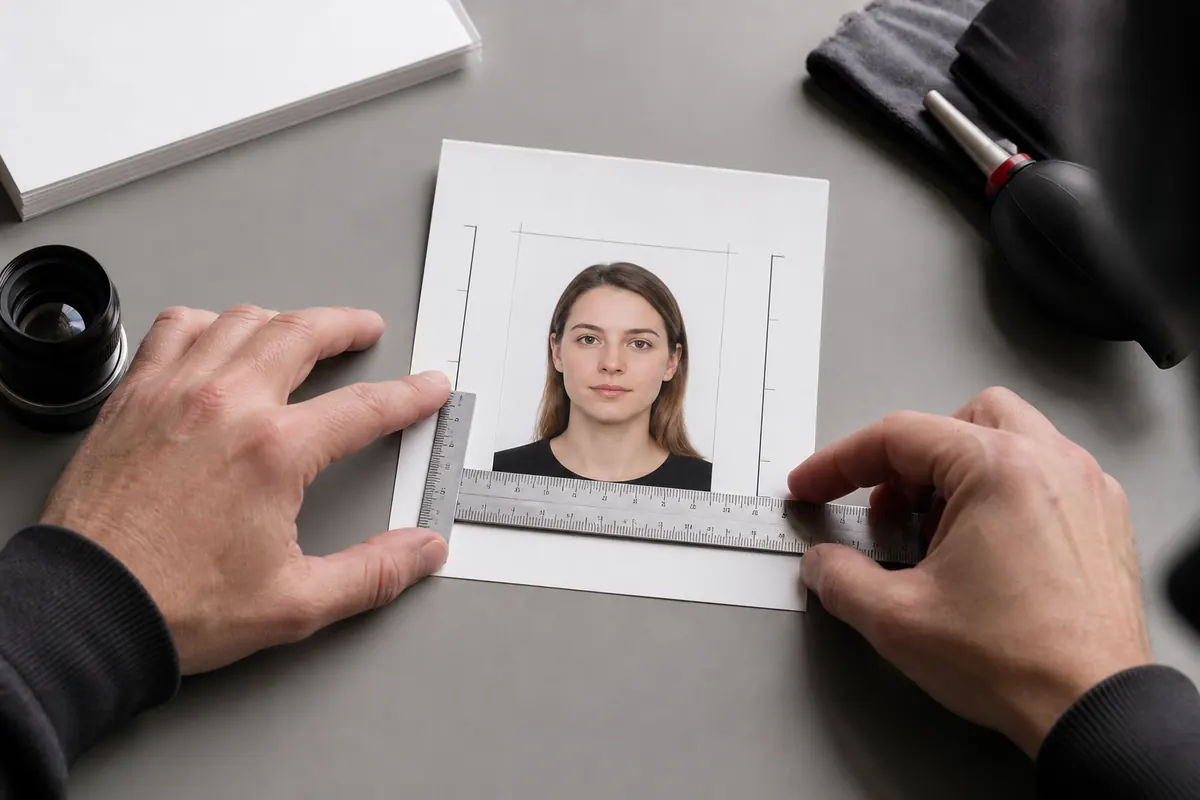
A Canadian passport photo is not the same as the square 2 × 2-inch U.S. format. Read our dedicated Canadian passport photo size guide for a clearer explanation of the dimensions and digital specifications.
3. Check focus, lighting and background
- The image must be clear, sharp and in focus.
- Lighting must be uniform, without shadows, glare or flash reflections.
- The background must be plain white or light-coloured, with clear contrast from the face, hair and clothing.
- Skin tone must look natural.
- The photo must not be retouched, filtered, AI-generated or altered.
Background replacement, smoothing skin, changing brightness or contrast, removing glare and digitally recropping the person onto a new background can all make the image unacceptable. The safest approach is to create the correct result with camera position and controlled lighting at the time of capture.
4. Check expression, eyes and posture
- Eyes open, clearly visible and looking toward the camera.
- Mouth closed, with no smile or frown.
- Face and top of the shoulders fully visible.
- No hair, accessory or head covering obscuring the face.
A neutral expression does not need to look tense. A photographer can help you relax while keeping the mouth closed and facial features natural.
5. Check glasses, clothing and head coverings
Prescription glasses may be worn only when the eyes remain clearly visible and there is no glare. Tinted glasses, sunglasses and red-eye are not accepted. Many photographers recommend removing glasses because it eliminates a common rejection risk. See our detailed guide to glasses in Canadian passport photos.
Hats and head coverings are not permitted unless worn for religious beliefs or medical reasons. The full face must remain visible, and the covering must not cast shadows. Avoid white clothing when it blends into the light background. Our guides to what to wear for a passport photo and passport-photo makeup rules cover these appearance questions in more detail.
6. Check the print quality and back-of-photo information
- Prints must be professionally produced on plain, high-quality photographic paper.
- Home-printed photos and heavyweight paper are not accepted.
- On the back of one print, the photographer must clearly write or stamp the date, studio name and complete address.
- A guarantor normally certifies one photo for a new adult or child application; an adult passport renewal does not require a guarantor on the photo.
Printed Photos vs. Online Renewal Files
For an eligible online renewal, the original digital photo must be a JPEG/JPG in portrait orientation with a 3:2 ratio. It must be between 1,200 × 1,800 and 3,000 × 4,500 pixels, between 200 KB and 5 MB, and the chin-to-crown measurement must occupy 45%–50% of the image height. You must also provide the photographer or studio name, address and date of capture.

The requirements can change, so verify the latest details on the official Government of Canada passport photo requirements page before submitting your application.
Common Reasons Canadian Passport Photos Get Rejected
- The print is the wrong size or the face height is outside 31–36 mm.
- The applicant is smiling, the mouth is open or the head is tilted.
- There are shadows behind the head or ears.
- Glasses create glare or hide the eyes.
- White clothing blends into the background.
- The image was retouched, filtered or altered with AI.
- The photo is more than six months old or no longer reflects the applicant’s appearance.
- The photographer’s address or date is missing from the back of the print.
- A scan or phone copy of a print is uploaded for an online renewal.
Can a Passport Photo Be Taken at Home?
A DIY selfie or home-printed photo does not meet the Canadian passport requirements. However, the appointment itself can take place in your home when a commercial photographer comes in person with a professional camera, backdrop, lighting and production workflow. This option is particularly useful for babies, seniors, people with disabilities and families who find studio travel difficult.
Read the explanation of whether passport photos can be taken at home in Canada, or visit our at-home passport photo service in Toronto and the GTA. We also offer dedicated guidance for newborn and baby passport photos and in-home passport photography for seniors.
Frequently Asked Questions
What size is a Canadian passport photo?
A printed Canadian passport photo must be 50 mm wide by 70 mm high. The face must measure between 31 mm and 36 mm from the bottom of the chin to the crown of the head.
Can I smile in a Canadian passport photo?
No. The required neutral expression means the mouth is closed, with no smile or frown, while the eyes are open and clearly visible.
Can I take my own passport photo with a phone?
No for an official Canadian passport submission. Printed applications require photos taken in person by a commercial photographer or photo studio. Eligible online renewals also require the photographer’s original digital file.
Are glasses allowed in Canadian passport photos?
Clear prescription glasses may be acceptable when there is no glare and the eyes are fully visible, but tinted glasses and sunglasses are not accepted. Removing glasses is often the safest choice.
How recent must the photo be?
The photo must have been taken within six months of the application date and must reflect your current appearance.
I’m truly enjoying the design and layout of your site. It’s a very easy on the eyes which makes it much more enjoyable for me to come here and visit more often. Did you hire out a developer to create your theme? Outstanding work!